
PLATFORM
Microsoft Teams.
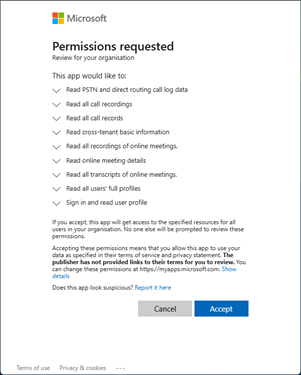
Dimensions can model Teams communications on their own or in conjunction with your PBX communications in order to provide a complete overview of your business communications. Microsoft Teams modelling uses the Microsoft Graph API to retrieve call and meeting data. Below is a guide on configuring Teams to support the Dimensions Microsoft Teams integration. For Dimensions to model Teams calls, the Dimensions application must be authorised to access the Microsoft Graph API under the context of the customer. To add a 'Teams' connection to a customer, navigate to 'Customers -> Phone Systems -> Connections', click on 'Create a new PBX' and select 'Teams' from the list. Enter a 'Name' and 'Country' for the connection, then follow 1 of the 2 options below based on who has the permission to enable the Dimensions application within the customer's Microsoft 365 Administration portal. You have permission If you have access tot he customer's Microsoft 365 Administration portal, you can enable the Dimensions application to access the Microsoft Graph API on behalf of the customer. Click on the 'Provision on Azure' button to begin the process. As long as you are logged in with correct Microsoft account, you will be prompted to allow the Dimensions application to access the Microsoft Graph API on behalf of the customer: Once the permission is granted, the new PBX connection you have added should be enabled and just needs saving to complete the process. Customer has permission If you do not have access to the customer's Microsoft 365 Administration portal, you will need to ask the customer to enable the Dimensions application to access the Microsoft Graph API on behalf of the customer. Save the new PBX connection you have added so that it is stored an is available for the customer to enable the Dimensions application. Edit the created PBX connection. The email field will now be enabled, allowing you to enter the customer's email address. Either: Once the customer has enabled the Dimensions application to access the Microsoft Graph API, the PBX connection will automatically be enabled and just needs saving to complete the process. To allow the name of the meeting to be set against the call model, can create a "Application Access" policy in Azure to allow the Dimensions client access to it. https://learn.microsoft.com/en-GB/graph/cloud-communication-online-meeting-application-access-policy Permission for this needs to be set using Powershell, in additional adding to the Application Id: To Check the Policy: To add an AppId to an existing policy: When enabled, a call answered by an Auto Attendant is reported as ringing only, it is not counted as answered until a user answers the call. Currently, the Graph API does not provide Webhook events for calls that are forwarded our to external numbers. This means that if a PSTN Teams calls are forwarded to another PSTN number, the second call will not be modelled in Dimensions.Requirements
info
The Microsoft Graph API does not provide call information in real-time. Call events are provided post call and can take up to 150 minutes to received.
Teams Configuration
PBX Configuration
tip
After enabling the Dimensions app on Teams, remember to run the Powershell script below to add permission to monitor meetings.
Allow Access to Meetings
Install-Module -Name PowerShellGet -Force -AllowClobber
Install-Module -Name MicrosoftTeams -Force -AllowClobber

Import-Module MicrosoftTeams
Connect-MicrosoftTeams

New-CsApplicationAccessPolicy -Identity Teams-Dimensions-Policy -AppIds "dfd5c2ad-a086-4414-8564-fb9b6197455c" -Description "Allow meeting access"
Grant-CsApplicationAccessPolicy -PolicyName Teams-Dimensions-Policy -Global
note
This can take about 30 minutes to take affect.
Get-CsApplicationAccessPolicy Tag:Teams-Dimensions-PolicySet-CsApplicationAccessPolicy -Identity Teams-Dimensions-Policy -AppIds @{Add="dfd5c2ad-a086-4414-8564-fb9b6197455c"}
Grant-CsApplicationAccessPolicy -PolicyName Teams-Dimensions-Policy -Global
Treat Auto Attendant answers as ringing
Known Issues
Trunk to Trunk Calls